


Apple TV Setup
Complete guide to install IBO Player Pro on Apple TV
Step 1: Prepare Apple TV
Set up your Apple TV and ensure it's connected to the internet
Step 2: Enable Developer Mode
Enable developer mode to install third-party apps
Step 3: Download TestFlight
Install TestFlight from the App Store
Step 4: Accept Beta Invite
Accept the beta testing invitation for IBO Player
Note: Beta versions may have some features in development
Step 5: Install IPTV Central Player
Install the IBO Player app from TestFlight
Step 6: Configure Playlist
Set up your IPTV playlist configuration
Method 1: Direct URL
Enter playlist URL directly in the app
Method 2: AirPlay
Use AirPlay to stream from your device
Step 7: Optimize Settings
Configure Apple TV settings for best performance
Apple TV Features
Maximize your Apple TV viewing experience
4K HDR Support
Enjoy stunning 4K HDR content when available
Dolby Atmos Audio
Immersive surround sound experience
Siri Remote Control
Voice search and intuitive navigation
AirPlay Streaming
Stream content from iOS devices
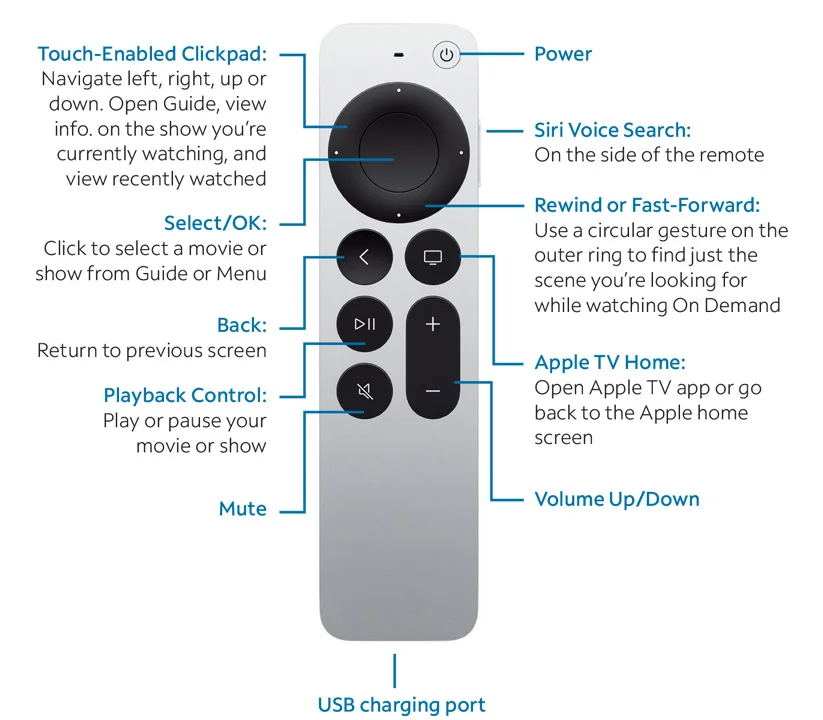
Siri Remote Control Guide
How to control IBO Player with your Siri Remote
Play/Pause
Press the play/pause button to control playback
Navigation
Use the touchpad to navigate through menus
Siri Search
Hold the mic button and speak your search
Home Menu
Press the home button to return to main menu
Troubleshooting
Common Apple TV setup issues
TestFlight not available
Make sure you're signed in with the correct Apple ID
Beta invite expired
Request a new beta invitation from support
Installation failed
Check available storage space on your Apple TV
Remote not responding
Check remote battery level and pair again if needed